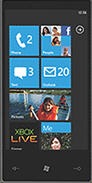
It is now possible to download the modified version of the great Fleux project by José Gallardo Salazar, which I used for KitchenPal Metro-style interface. I added some custom UI controls (Tile, ApplicationBar, Textbox, Checkbox, Button, ImageButton, WrapPanel) and added general support for Windows CE 6.x/7.x devices, in addition to Windows Mobile. Maybe in the future these enhancements could be integrated in the main project. For now, download the source code from here and use it in your embedded projects! Let me know if you use it or find/fix any issues.
Showing posts with label windows mobile. Show all posts
Showing posts with label windows mobile. Show all posts
Sunday, November 6, 2011

Sunday, May 1, 2011
embeddedSPARK Challenge 2011 – Round 2

You can see them at the official challenge entry page.
This time I made it. It's been hard but really fun and interesting. Results will come soon…
Tuesday, September 21, 2010
Windows Mobile to Android

Let’s start with an introduction to the Android platform, to its features and to all the required stuff to begin.
Hardware and Software Requirements
Hardware
For all practical purposes, your choices come down to using a PC (Windows/Linux) or a Mac, with at least 3GB of disk space and 2GB of RAM. Optionally, an Android phone can be useful for testing/debugging purposes (but everything can be done using the software Android emulator only).
Software
- Operating system:
- Windows XP (32bit), Windows Vista (32/64-bit) or Windows 7 (32/64-bit)
- Mac OS X 10.5.8 or later (x86 only)
- Linux (32bit)
-
- Eclipse IDE 3.4 or 3.5
- Eclipse JDT plug-in
- Android Development Tools (ADT) plug-in (optional)
- At least one Android platform (i.e. Android 1.5, Android 1.6, Android 2.2, etc.)
- Other SDK auxiliary components (i.e. for Windows, USB driver to attach a phone to the PC)
Android Market
To publish your mobile applications through the Android Market, you have only to register and pay a very little one-time fee, which you can do at http://www.android.com/market/. Differently from Microsoft and Apple application stores, there is no review process and distributing apps through the Market is non-exclusive; you may choose to distribute your applications through other channels as well. In addition, Android Market offers a licensing service that lets you enforce licensing policies for the applications that you publish through Android Market: with the licensing service, your applications can query Android Market at run time to obtain their licensing status for the current user, then allow or disallow further use as appropriate.
Key Points
Native, .NET and Java
Windows Mobile application can be written in C/C++ or, using .NET Compact Framework, in VB.NET/C#. To write application for Android platform, in addition to learning its frameworks and becoming comfortable with Eclipse, you will have to learn Java. If you are a C# programmer, a part from little syntax differences and constructs, you’re already able to read and write programs in Java proficiently; if you know C/C++ or other languages, learning Java should be easy. For those who don’t know Java:
- it’s an object-orientated programming language (except the primitive data types, all elements in Java are objects);
- it’s strongly-typed (types of the elements must be pre-defined and conversion to other objects is relatively restricted);
- it’s has automatic memory management: Java manages the memory allocation and de-allocation for creating new objects. The program does not have direct access to the memory. The garbage collector deletes automatically object to which no active pointer exists. But this doesn’t mean that the developer shouldn’t be aware of limited resources and memory leaks;
- it’s platform independent: Java program do in general not access directly system resources but use a Java virtual machine as abstraction;
- it’s an interpreted and compiled language: Java source code is transferred into byte-code which does not depend on the target platform. This byte-code will be interpreted (and/or compiled using JIT techniques) by the Java Virtual machine (JVM). Specifically, Android platform uses a custom Google implementation of the JVM: the Dalvik VM.
It is also possible (starting from Android 1.5) to develop native C/C++ application through the Android Native Development Kit (NDK).
Optimized memory, process management and services
Like Java and .NET, Android uses its own run-time engine and virtual machine (Dalvik VM) to manage application memory. But differently from the others, the Android run-time also manages the process lifetimes: it ensures application responsiveness by stopping and killing processes as necessary to free resources for higher-priority applications.
In addition Android supports applications and services designed to run invisibly in the background: background services make it possible to create invisible application components that perform automatic processing without direct user action. Background execution allows your applications to become event-driven and to support regular updates, or prioritizing and filtering incoming calls and messages.
Programming Environment
Coding in the Java language within Eclipse is very intuitive; Eclipse provides a rich Java environment (almost equivalent to Visual Studio), including advanced debugging features (in the emulator or directly on a physical device), context-sensitive help, auto-completion (similar to Visual Studio IntelliSense feature), code suggestion hints and more. Once your Java code is compiled cleanly, the Android Developer Tools make sure the application is packaged properly, including the AndroidManifest.xml file.
It's possible to develop Android applications without Eclipse and the Android Developer Tools plug-in, but you would need to know your way around the Android SDK and its command-line tools.
Graphical User Interfaces (GUI)
The user interface for an Android app can be created using two techniques:
- programmatic: using Java code to create the user interface widgets (similarly to the way Windows Mobile application user interfaces are built)
- declarative: creating XML files that configures the user interface (similarly to WPF/Silverlight XAML files)
The declarative approach is preferred whenever possible. One obvious advantage is the relatively easy to make minor changes to the user interface without modifying the Java code. It consists of an Android UI specific set of XML tags that can be used to parameterize and link together Java based user interface widgets. Each widget in the UI is a View and each set of widgets comprising a user interface is typically a tree of Views.
Eclipse environment helps you to create application user interfaces through a drag-and-drop graphical designer, similar to Visual Studio’s Form Design/XAML view. There are also developer tools which let you inspect/edit GUI at run-time, directly in the emulator or on a physical device, and there is an open-source tool which can help in developing Android app GUI graphically: DroidDraw.
Android, graphics and games
Even though Java is the primary development language for Android, Google has realized the need for combined Java/C development in order to make Android succeed as a gaming platform: so they released the Native Development Kit (NDK) starting from Android 1.5. Google is realizing the need to support C development to catch up with the overwhelming number of native games written for other mobile platforms, like the iPhone. PC/console games have been around for decades (mostly written in C/C++), and by using a “simple” ARM C compiler, you could potentially bring thousands of existing games to the Android Platform. In addition, Android provides graphics libraries for 2D canvas drawing and 3D graphics with OpenGL, to help you make the most of the high-end hardware which current mobile phone are equipped with. Android also offers comprehensive libraries for handling still images, video and audio files, including JPG, PNG, MPEG4, H.264, MP3, AAC file formats.
Easy access to hardware
On Windows Mobile, hardware can be accessed via native C/C++ applications or with lots of P/Invokes to call native functions from .NET Compact Framework. Android, instead, includes API libraries to simplify development involving the device hardware: these ensure that you don’t need to create specific implementations of your software for different devices, so you can create Android applications that work as expected on any device that supports the Android software stack. The Android SDK includes APIs for location-based hardware (such as GPS and Google’s GSM cell-based location technology), the camera, audio, network connections, Wi-Fi, Bluetooth, accelerometers, the touch screen and power management.
Customization: all applications are created equal!
How many times, as Windows Mobile developer, you desired to change the look and feel of the Home Screen, create an alternative message or contacts manager, or deeply interact with contacts, calls, messages, logs? How long did it take to achieve a satisfactory result? With Android, forget all the pain. The system has been designed in such a way that it doesn’t differentiate between native applications and those developed by third parties. This gives consumers unlimited power to change the look and feel of their devices by letting them completely replace every native application with a third-party alternative that has access to the same underlying hardware and data.
Intra/Inter-application communication and SQLite Databases
There is almost no equivalence in Windows Mobile (even if it is possible, but it can be hard to achieve the same results). Android includes three techniques for transmitting information from your applications to be used somewhere else: intents, notifications and content providers.
- Intents provide a mechanism for exchanging intra/inter-applications messages. Using intents you can broadcast a desired action (such as dialing the phone, sending an SMS or editing a contact) in order that other applications in the system may handle it.
- Notifications are the standard means by which users can be alerted: using the API you can trigger vibration, audio alerts, control status bar notification icons and flash the device’s LED.
- Finally, you can use Content Providers to give managed access to your application’s private databases. For example, the data stores of Android’s native applications, such as the contact manager, the calls log or the SMS database, are exposed as Content Providers so you can create your own applications that read or modify this data.
For each application, then, Android provides an integrated, lightweight, relational database: SQLite. As Windows Mobile user, probably you are used to SQL CE databases. They’re powerful, but nothing compared to SQLite in terms of performance and resource occupation. Your applications can take advantage of this managed relational database engine to store data securely and efficiently. By default each application database is sandboxed, meaning that its content is available only to the application that created it, but through content providers they can be easily shared to others.
What’s next?
I’m actually working, in my free time, on two personal projects for Windows Mobile. I started to plan and analyze things in order to port one of the two applications on the Android Platform: my idea is to use this application as the object of the the next articles. Here there are some of the topics:
- A look to Eclipse IDE
- How to create/debug/run an Android project
- Building the user interface
- Accessing and controlling device hardware
- Localization
- Packaging and deploying
If you are interested in something particular or if you have some questions/comments, let me know!
Sunday, March 21, 2010
Embedded contest update and Microsoft certification exams
Some weeks ago I announced that I would have written some posts about my work for Microsoft Embedded Sparks 2010 contest. Sadly and unfortunately, due to little free time in the last period and to some hardware/software issues while preparing the contest prototype, I had to stop the development. Maybe I will retry next year…
Meanwhile, I also studied to take two Microsoft Certification exams. I took the first one in mid-December: it was the beta version of Windows Mobile 6.5 - Application Developer exam. I received the communication that I passed it just ten days ago. On last Wednesday, then, I took and passed the Windows Embedded CE 6.0 - Development exam. Now I’m a Microsoft Certified Technology Specialist in embedded field… but that’s just the beginning: I already started to study for a new Embedded exam, Windows Embedded Standard 7 for Developers (previously known as Windows Embedded Standard 2011), which I’ll take as soon as it become available (maybe in mid-June).
Monday, November 30, 2009
Phome: a new generation home phone
It’s been a while since my first post. I had promised myself to dedicate the right time and efforts in order to regularly write articles about my technology interests, but unfortunately I failed. I’ve been a lot busy in the last two months. Precisely, not just in the last two months, but in the last ten: a part from finishing my University exams, I worked almost every day (and night) on my Master Degree Thesis. Now, I got everything finished.
Here’s a description of what I developed, maybe some of you may find it interesting.
The beginning: the digital house of the future
Everything started in December 2008. I was looking for an idea to participate to the international contest SPARKS Will Fly 2009, organized by Microsoft to promote its embedded technologies among hobbyists developers and technology geeks. The contest’s theme was the Digital House of the future: to participate one had to submit a 1-3-page paper that outlined an embedded project that could be built using Microsoft Embedded technologies such as Windows Embedded CE 6.0 R2, Visual Studio 2005 and an EmbeddedSpark Kit (VIA ARTiGO A1000 Barebone Pico-ITX Builder Kit).
The basic idea was suggested to me by my 80-years-old grandmother, after the ordinary “tech-lesson” we had almost every evening, due to her difficulties using mobile phones, TV+VCR+DVD remote controllers, or any other technological device. I had a vision of a possible partial solution to a problem that people continuously faces every day.
 We are surrounded by a huge amount of communication devices: home telephone, mobile/smart phones, fax, Instant Messaging applications, web browsers, E-Mail clients, VoIP software, Media Centers, gaming consoles, etc. Beyond the connection line there is the whole world, but often all these technologies are designed to be used just by a minority of family members, for young technology-minded people and always on-the-move: children, teenagers, parents. And the others? Aged people, technology-scared housewives, people with disabilities, people who have no in-house tech-children, people who think that sending an SMS or surfing the web is too much difficult? Why one’s grandmother cannot chat, surf on the web or send an E-Mail or an SMS? And what if she lives alone and has some disabilities (e.g. deafness, blindness, etc.) and would like to call somebody, keep in touch with relatives or receive phone-calls?
Almost all communication devices are too much difficult to be used for non-technologic people and offer their functionalities in inaccessible ways, with hundreds of buttons, menus, sub-menus, options. Each device is different from the others (user interfaces are complex and require dedicated training before it is possible to use their functionalities) and rarely they can share data in an easy and automatic way or let inter-communication processes take place.
What if something could manage all communication tasks in a consistent, automatic, easy and accessible way for all family members?
Here’s the paper submitted in January 2009 to contest’s first round: Home Communication Concentrator (HCC).
HCC: contest prototype
Home Communication Concentrator’s vision consists of a wired/wireless network of embedded devices with touch-screen display, which manages home communication tasks for non-technologic people especially. Devices can be placed wherever is most suitable for one’s needs and good-looking according to one’s house architectural styles, on flat surfaces or hung to walls.

HCC device main activity is to monitor and manage home communication tasks:
- phone calls / video calls / VOIP
- E-Mail messages
- Instant Messaging and chat sessions
- Web browsing
- Contact list / Calendars / To-Do list
All activities can be controlled directly via natural voice commands or by touching the display. User interface is very simple and does not need any training: doing any of the activity is as simple as making a phone call (or even simpler). The system can interact with the user by voice and sounds and/or by text messages and images on the display.
While not in use, an HCC device can be used as a digital picture for photo slideshows, video playback or almost any purpose someone can think of (it is possible to extend stand-by activities with custom widgets).
The proposed idea passed the first round judgment (just 50 entries on more than 150) and between January and March 2009 I started to develop a working prototype of the system, using Windows Embedded CE 6.0 R2, Visual Studio 2005 and the VIA Artigo Kit. To participate to contest’s second round, one had to submit a 2-minutes video showing the working device.
My HCC’s video is available here. And here there is the accompanying presentation paper.
Unfortunately the work didn’t pass to the final round, meanwhile I shown the “proof-of-concept” prototype to a professor of mine at the Polytechnic of Turin, Giovanni Malnati, and he agreed to let me continue the work in my Information Technology Engineering Master Degree thesis. Thanks to him, to Beppe Platania (Beps Engineering) and to Raffaele Menolascino (Microsoft), I developed my thesis hosted by Microsoft Innovation Center Torino.
Phome: thesis, technologies and architecture
Thesis main goal was to design and develop a prototypal embedded system to manage communication tasks, which in a near future could become a new generation home-phone. The system had to make modern communication technologies such as Internet, Mobile Phones, E-Mail, SMS and Telephone easy and accessible to all family members, for aged and non-technologic people especially. Everything had to be implemented using existing technologies (Microsoft Embedded, especially) in order to reduce costs and have a little time-to-market.
Due to many problems faced during the development of the contest’s prototype, particularly the lack of a rich-user-interface framework in Windows Embedded CE and a limited hardware kit (Bluetooth USB dongle compatibility problems, little touch-screen display, limited network capabilities), for the thesis work I decided to switch to another Microsoft Embedded technology and another hardware platform. So the new prototype has been implemented using an Asus EeeTop device, equipped with a custom Microsoft Windows Embedded Standard (WES) image. Telephony features are provided by a Bluetooth enabled HTC Touch Diamond mobile phone, based on Microsoft Windows Mobile 6.1 operating system.

Phome is a multi-purpose, all-in-one and good-looking new generation home-phone: it can manage phone calls, phonebook, SMS, E-Mails, Web Browser and Photos (digital frame) through an intuitive, easy and touch-friendly user interface, especially designed for aged and/or non-technologic people, which requires just a minimum effort to learn how to use it. The user interface, among other things, includes a Virtual Keyboard and a Virtual Numpad to let the system be used without external keyboard/mouse, a predictive large vocabulary input system and Text-To-Speech helper features.
Telephone and SMS features are provided by a Bluetooth mobile phone: Phome is a “Home” Bluetooth Headset unit that, when connected to a device, becomes its wireless speakerphone. Thanks to the Phome Mobile Service, a custom Bluetooth profile based on an ad-hoc client/server protocol, it represents a simple and intuitive remote control interface for mobile phones, letting aged people to use these devices to make phone calls, send/receive SMS messages or managing the phonebook through a simple and eyesight-friendly interface. The profile has been introduced to abstract the implementation from a particular mobile phone and its operating system, making Phome potentially compatible with any Bluetooth mobile phone.
The prototype has been implemented on Windows Mobile based phones (using .NET Compact Framework 3.5), but a feasibility study has been conducted on Android and Java J2ME platforms as well.
To add Bluetooth connectivity to the EeeTop, a Bluetooth USB adapter based on Widcomm stack has been used: the Widcomm stack has been chosen because it’s the only stack which gives free and well documented API that developers can use to access low-level parts, audio SCO connection included, and which let me to re-implement the Bluetooth Headset profile according to standard specifications, and to control audio routing using Win32 Multimedia API.
In addition to the WES system image, I designed and implemented:
While not in use, an HCC device can be used as a digital picture for photo slideshows, video playback or almost any purpose someone can think of (it is possible to extend stand-by activities with custom widgets).
The proposed idea passed the first round judgment (just 50 entries on more than 150) and between January and March 2009 I started to develop a working prototype of the system, using Windows Embedded CE 6.0 R2, Visual Studio 2005 and the VIA Artigo Kit. To participate to contest’s second round, one had to submit a 2-minutes video showing the working device.
My HCC’s video is available here. And here there is the accompanying presentation paper.
Unfortunately the work didn’t pass to the final round, meanwhile I shown the “proof-of-concept” prototype to a professor of mine at the Polytechnic of Turin, Giovanni Malnati, and he agreed to let me continue the work in my Information Technology Engineering Master Degree thesis. Thanks to him, to Beppe Platania (Beps Engineering) and to Raffaele Menolascino (Microsoft), I developed my thesis hosted by Microsoft Innovation Center Torino.
Phome: thesis, technologies and architecture
Thesis main goal was to design and develop a prototypal embedded system to manage communication tasks, which in a near future could become a new generation home-phone. The system had to make modern communication technologies such as Internet, Mobile Phones, E-Mail, SMS and Telephone easy and accessible to all family members, for aged and non-technologic people especially. Everything had to be implemented using existing technologies (Microsoft Embedded, especially) in order to reduce costs and have a little time-to-market.
Due to many problems faced during the development of the contest’s prototype, particularly the lack of a rich-user-interface framework in Windows Embedded CE and a limited hardware kit (Bluetooth USB dongle compatibility problems, little touch-screen display, limited network capabilities), for the thesis work I decided to switch to another Microsoft Embedded technology and another hardware platform. So the new prototype has been implemented using an Asus EeeTop device, equipped with a custom Microsoft Windows Embedded Standard (WES) image. Telephony features are provided by a Bluetooth enabled HTC Touch Diamond mobile phone, based on Microsoft Windows Mobile 6.1 operating system.

Phome is a multi-purpose, all-in-one and good-looking new generation home-phone: it can manage phone calls, phonebook, SMS, E-Mails, Web Browser and Photos (digital frame) through an intuitive, easy and touch-friendly user interface, especially designed for aged and/or non-technologic people, which requires just a minimum effort to learn how to use it. The user interface, among other things, includes a Virtual Keyboard and a Virtual Numpad to let the system be used without external keyboard/mouse, a predictive large vocabulary input system and Text-To-Speech helper features.
Telephone and SMS features are provided by a Bluetooth mobile phone: Phome is a “Home” Bluetooth Headset unit that, when connected to a device, becomes its wireless speakerphone. Thanks to the Phome Mobile Service, a custom Bluetooth profile based on an ad-hoc client/server protocol, it represents a simple and intuitive remote control interface for mobile phones, letting aged people to use these devices to make phone calls, send/receive SMS messages or managing the phonebook through a simple and eyesight-friendly interface. The profile has been introduced to abstract the implementation from a particular mobile phone and its operating system, making Phome potentially compatible with any Bluetooth mobile phone.
The prototype has been implemented on Windows Mobile based phones (using .NET Compact Framework 3.5), but a feasibility study has been conducted on Android and Java J2ME platforms as well.
To add Bluetooth connectivity to the EeeTop, a Bluetooth USB adapter based on Widcomm stack has been used: the Widcomm stack has been chosen because it’s the only stack which gives free and well documented API that developers can use to access low-level parts, audio SCO connection included, and which let me to re-implement the Bluetooth Headset profile according to standard specifications, and to control audio routing using Win32 Multimedia API.
In addition to the WES system image, I designed and implemented:
- a Windows Presentation Foundation application, PhomeUI, which acts as the system shell and replaces the native Windows shell “explorer”; it has been designed with a layered and modular architecture, using some recent design pattern like Model-View-ViewModel (MVVM), Separated Presentation and Composite Application, in order to support designer/developer roles separation, expansions/plug-ins, testing and a rich-user-interface framework (that let me develop all the user interface in less than two months, while working on all the other system components).

- shared libraries (some native C++ and some managed C#) that provide the shell:
- Bluetooth management + profiles (native)
- Bluetooth audio management (native)
- 3-tier database access layer to MS-SQL CE db
- Many custom WPF UI controls
- Basic shell and application modules functions such as events, commands, Bluetooth Manager, Audio Manager, E-Mail Manager/POP3 Client, Settings Manager, MSAPI 5.1 Text-To-Speech)
- Basic UI functionalities (run-time loaded modules and composite user interface, Module Manager, Virtual Keyboard/Numpad and other UI controls)
 a .NET Compact Framework 3.5 application, PhomeServiceServer, which implements the custom Bluetooth Profile Phome Mobile Service on Windows Mobile 6.0 (or greater) devices.

- sample application modules, all developed with the MVVM pattern, which provide the end-user:
- phone management functionalities (phone call dialing/answer, phonebook, favorite numbers);
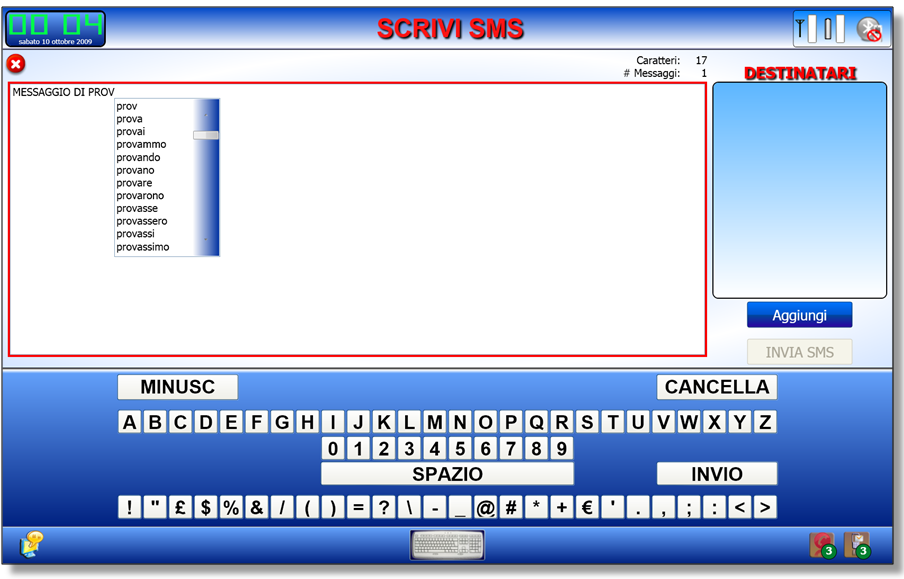
- SMS management (received, sent, draft, composition, Virtual Keyboard + Predictive Input aids);
- E-Mail management (multi-POP3 account support, received/sent/draft messages, composition);
- Phome Device Settings/one-touch Bluetooth configuration;
- Home screen
- Web Browser (based on Google Chromium project, integrated in WPF using a modified open-source wrapper which make it usable with the virtual keyboard);
- Photo Album (photo viewer and full screen slideshow).
Here are some screenshots and photo taken of the device and its touch-enabled user interface during the development stage.


Conclusions
The implemented prototype system has got a minimum set of sample features, which let people and developers to evaluate its behavior in a common house environment. The goals were not to obtain a complete and working device, but to show that such kind of easy-to-use devices can be built today, with existent hardware and software technologies, despite the thousands of complicated communication device that surrounds us every day.
Obviously there’s plenty room for improvements and I already have some ideas for future developments and better user-machine interaction and house-environment integration, but for now I’m very satisfied about the reached results, the Master Degree and happy about the fact that now my grandmother can send and receive SMS/E-mails and make phone calls using its mobile phone with just few taps on Phome.
Subscribe to:
Posts (Atom)