Sunday, February 14, 2010

Single-workstation virtualized development environment

At work and at home I have just one development machine and I usually need to use different versions of development environments and tools. For example, to build Windows CE 6.0 images, one needs Visual Studio 2005, Windows CE 6.0 Platform Builder, their service packs, Windows Vista/Windows 7 compatibility updates (if you don’t use Windows XP), Windows CE monthly updates. If you have a clean development machine with just the previous listed software, there should be no problems. Everything should work fine, debugging on remote devices works, builds should complete successfully (apart from normal building errors and bad configurations, but nothing depending on operating system configurations or installed software).

But what if you also need to develop .NET Compact Framework 3.5 applications for Windows Phones? On your development machine you have to install Visual Studio 2008 and Windows Mobile SDKs/tools. Of course, you would like that all the previous installed software still continue to work as before: that’s the problem. It’s not that easy reaching this goal. Visual Studio 2008 updates some system components that are used by Visual Studio 2005 and Platform Builder for Windows CE development, and that can cause compatibility issues when debugging Windows Mobile/Windows CE devices. It’s not impossible installing and working side-by-side with the two systems, but it is necessary to pay great attention with applications installation order, tools installation order, updates installation order. As time goes by, something will break and, for example, it will not be possible anymore to build Windows CE images or remotly debug a device.

If you also need to use SQL Server databases, some 2005 version and some 2008 version, you have to install both on your machine. I know that the problem wouldn’t exist if 2005 databases could be updated to 2008 version (but some customers don’t allow this) or if I had other machines/development servers to install them separately. Searching on the web, in forums and blogs, many people say that the two versions can work together without any problems. I tried and for my work needs (Management Studio, query analyzer, database backups, remote database access) it works. Nevertheless, many people reported problems with Management Studio, Integration Services and Analysis services, but I cannot say more about that, because I have no experience.

Upset with these (and many others) compatibility issues in everyday development tasks, during Christmas holiday I started to experiment a virtualized development environment on my home workstation. After one month of everyday usage, I decided to adopt the same development configuration at work.

In a number of next posts I’ll give you an overview of my virtualization experiments, with problems I had and solutions I found.

For those who doesn’t know what virtualization is, there’s a brief introduction. For more information, start having a look at Wikipedia entries (http://en.wikipedia.org/wiki/virtualization).


What is virtualization?

The term "virtualization" was coined in the 1960s, to refer to a virtual machine: in general an abstraction of a computer resource. This includes making a single physical resource appear to work as multiple logical resources (such as a server, an operating system, an application, a device) or it can include making multiple physical resources (such as servers or storage devices) appear as a single logical resource. The creation and management of virtual machines has been called platform virtualization, or server virtualization, more recently.

Platform virtualization is performed on a given hardware platform by a control program (host software), which creates a simulated computer environment, a virtual machine, for its guest software. The guest software is not limited to user applications; many hosts allow the execution of complete operating systems. The guest software executes as if it were running directly on the physical hardware, but with some limitations. Access to physical system resources (network access, display, keyboard, disk storage, USB devices, etc.) is generally managed at a more restrictive level than the processor and system-memory. Guests are often restricted from accessing specific peripheral devices, or may be limited to a subset of the device's native capabilities, depending on the hardware access policies implemented by the virtualization host.

Many commercial, freeware (and some even open-source) virtualization software exist for many operating systems. Just to cite some of them, without any particular order:

  • VMWare Workstation
  • Microsoft VirtualPC
  • VMWare Server
  • Sun VirtualBox
  • Microsoft Hyper-V
  • QEMU
  • Microsoft Virtual Server
  • Parallels for Desktop
  • Parallels Workstation
  • …

For other software and further information: http://en.wikipedia.org/wiki/Comparison_of_platform_virtual_machines


Virtualization Uses

Virtualization can be used in various context and modes. Mainly it can be useful for:

  • Server consolidation (consolidating low-usage systems onto one physical server; consolidating systems using old or outdated operating systems)
  • Software testing (QA testing; portability validation; new operating systems)
  • Safe web navigation (dangerous sites; research; downloads; automated scripts; validation; security testing; etc.)
  • Tech support (customer OS/software in VMs; re-create client’s environments in virtual ones)
  • Software evaluation (features and compatibility tests; scalability simulation; screen capture; snapshots of deployed VM for future replay)
  • Training (no configuration issues from trainers and students; practice machines)
  • Demos (fresh VM for every demo provides repeatable experience)
  • Load balancing (clusters of VMs rather than of hardware nodes)
  • Grids (Cloud computing)
  • Software development (developers use a hosted VM with all resources on local systems)

In the last few years virtualization started to take greater and greater place in IT deployment strategies and usage. Some of the previous scenarios are currently used, while other are just entering the virtualization world. Sure is that virtualization in IT will grow in the future,  because its benefits are compelling.

The last point is the previous list represents the starting point of my experiments. In one of the next posts, we’ll see how I interpreted this use of virtualization.

Thursday, February 4, 2010

Windows Embedded Standard 2011

Windows Embedded Standard 2011 is the next version of Windows Embedded Standard 2009 and it will be based on Windows 7. Standard-2011 Release Candidate will be available soon: to begin discovering the new platform, thanks to an agreement with Microsoft Windows Embedded Team, Beppe Platania (Beps Engineering CEO), started to post on his blog an Italian translation of the Windows Embedded Blog articles regarding the product.

Articles will be posted on weekly basis and the first one has just been posted some days ago. If you’re interested, stay tuned on Beppe’s blog!

Saturday, January 16, 2010

New year… new contest

AR-DressUpIt was almost the same period one year ago when I got noticed that my proposed idea, Home Communication Concentrator, was announced as one of the 50 world-wide First Round Winners in Microsoft’s Sparks Your Imagination 2009 contest (you can read about it in my previous post). It was very interesting participating last year, so I decided to participate again to this year edition, EmbeddedSpark 2010 Challenge.

Yesterday evening, after an impatience waiting, 2010 First Round Winners have been finally announced, and I was very happy to discover that my proposed idea is one of them again!

Last year contest’s theme was about the Digital house of the future. This year, instead, it’s about Fun & Games.  During the Christmas holidays I came up with some ideas and one of them, inspired by my sister two years ago, became the proposed one: AR-DressUp. Get more information from contest’s entry document, you can find it here: AR-DressUP Contest Entry.


During the next weeks I’ll be posting about the prototype development, so stay tuned!


For those of you that don’t know Microsoft EmbeddedSpark initiative, it is a collection of Windows Embedded software for hobbyists which consists of:

  • A full version of Windows Embedded CE 6.0 R2

  • A full version of Visual Studio 2005 Professional

  • A SPARK-selected board from one of the seven Microsoft’s hardware partners

Usually, participating to the program means that you get the software and the hardware for the price of the board.

Among many initiatives (blogs, documentation, classrooms, hands-on labs, community forum, etc.) Microsoft organizes also a contest for embedded hobbyists and gives an EmbeddedSpark kit for free to those who pass the first round selection in the contest.

The contest is a skill-based and chance plays no part in the determination of the winner(s). The object of the contest is to provide a forum for Windows Embedded CE enthusiasts to showcase their skills, help build the Windows Embedded community and drive awareness of the SPARK Your Imagination / EmbeddedSpark program.

Monday, November 30, 2009

Phome: a new generation home phone

It’s been a while since my first post. I had promised myself to dedicate the right time and efforts in order to regularly write articles about my technology interests, but unfortunately I failed. I’ve been a lot busy in the last two months. Precisely, not just in the last two months, but in the last ten: a part from finishing my University exams, I worked almost every day (and night) on my Master Degree Thesis. Now, I got everything finished.
Here’s a description of what I developed, maybe some of you may find it interesting.


The beginning: the digital house of the future

Everything started in December 2008. I was looking for an idea to participate to the international contest SPARKS Will Fly 2009, organized by Microsoft to promote its embedded technologies among hobbyists developers and technology geeks. The contest’s theme was the Digital House of the future: to participate one had to submit a 1-3-page paper that outlined an embedded project that could be built using Microsoft Embedded technologies such as Windows Embedded CE 6.0 R2, Visual Studio 2005 and an EmbeddedSpark Kit (VIA ARTiGO A1000 Barebone Pico-ITX Builder Kit).

The basic idea was suggested to me by my 80-years-old grandmother, after the ordinary “tech-lesson” we had almost every evening, due to her difficulties using mobile phones, TV+VCR+DVD remote controllers, or any other technological device. I had a vision of a possible partial solution to a problem that people continuously faces every day.


We are surrounded by a huge amount of communication devices: home telephone, mobile/smart phones, fax, Instant Messaging applications, web browsers, E-Mail clients, VoIP software, Media Centers, gaming consoles, etc. Beyond the connection line there is the whole world, but often all these technologies are designed to be used just by a minority of family members, for young technology-minded people and always on-the-move: children, teenagers, parents. And the others? Aged people, technology-scared housewives, people with disabilities, people who have no in-house tech-children, people who think that sending an SMS or surfing the web is too much difficult? Why one’s grandmother cannot chat, surf on the web or send an E-Mail or an SMS? And what if she lives alone and has some disabilities (e.g. deafness, blindness, etc.) and would like to call somebody, keep in touch with relatives or receive phone-calls?

Almost all communication devices are too much difficult to be used for non-technologic people and offer their functionalities in inaccessible ways, with hundreds of buttons, menus, sub-menus, options. Each device is different from the others (user interfaces are complex and require dedicated training before it is possible to use their functionalities) and rarely they can share data in an easy and automatic way or let inter-communication processes take place.

What if something could manage all communication tasks in a consistent, automatic, easy and accessible way for all family members?

Here’s the paper submitted in January 2009 to contest’s first round: Home Communication Concentrator (HCC).


HCC: contest prototype

Home Communication Concentrator’s vision consists of a wired/wireless network of embedded devices with touch-screen display, which manages home communication tasks for non-technologic people especially. Devices can be placed wherever is most suitable for one’s needs and good-looking according to one’s house architectural styles, on flat surfaces or hung to walls.


HCC device main activity is to monitor and manage home communication tasks:
  • phone calls / video calls / VOIP
  • E-Mail messages
  • Instant Messaging and chat sessions
  • Web browsing
  • Contact list / Calendars / To-Do list
All activities can be controlled directly via natural voice commands or by touching the display. User interface is very simple and does not need any training: doing any of the activity is as simple as making a phone call (or even simpler). The system can interact with the user by voice and sounds and/or by text messages and images on the display.
While not in use, an HCC device can be used as a digital picture for photo slideshows, video playback or almost any purpose someone can think of (it is possible to extend stand-by activities with custom widgets).

The proposed idea passed the first round judgment (just 50 entries on more than 150) and between January and March 2009 I started to develop a working prototype of the system, using Windows Embedded CE 6.0 R2, Visual Studio 2005 and the VIA Artigo Kit. To participate to contest’s second round, one had to submit a 2-minutes video showing the working device.
My HCC’s video is available here. And here there is the accompanying presentation paper.

Unfortunately the work didn’t pass to the final round, meanwhile I shown the “proof-of-concept” prototype to a professor of mine at the Polytechnic of Turin, Giovanni Malnati, and he agreed to let me continue the work in my Information Technology Engineering Master Degree thesis. Thanks to him, to Beppe Platania (Beps Engineering) and to Raffaele Menolascino (Microsoft), I developed my thesis hosted by Microsoft Innovation Center Torino.


Phome: thesis, technologies and architecture

Thesis main goal was to design and develop a prototypal embedded system to manage communication tasks, which in a near future could become a new generation home-phone. The system had to make modern communication technologies such as Internet, Mobile Phones, E-Mail, SMS and Telephone easy and accessible to all family members, for aged and non-technologic people especially. Everything had to be implemented using existing technologies (Microsoft Embedded, especially) in order to reduce costs and have a little time-to-market.

Due to many problems faced during the development of the contest’s prototype, particularly the lack of a rich-user-interface framework in Windows Embedded CE and a limited hardware kit (Bluetooth USB dongle compatibility problems, little touch-screen display, limited network capabilities), for the thesis work I decided to switch to another Microsoft Embedded technology and another hardware platform. So the new prototype has been implemented using an Asus EeeTop device, equipped with a custom Microsoft Windows Embedded Standard (WES) image. Telephony features are provided by a Bluetooth enabled HTC Touch Diamond mobile phone, based on Microsoft Windows Mobile 6.1 operating system.


Phome
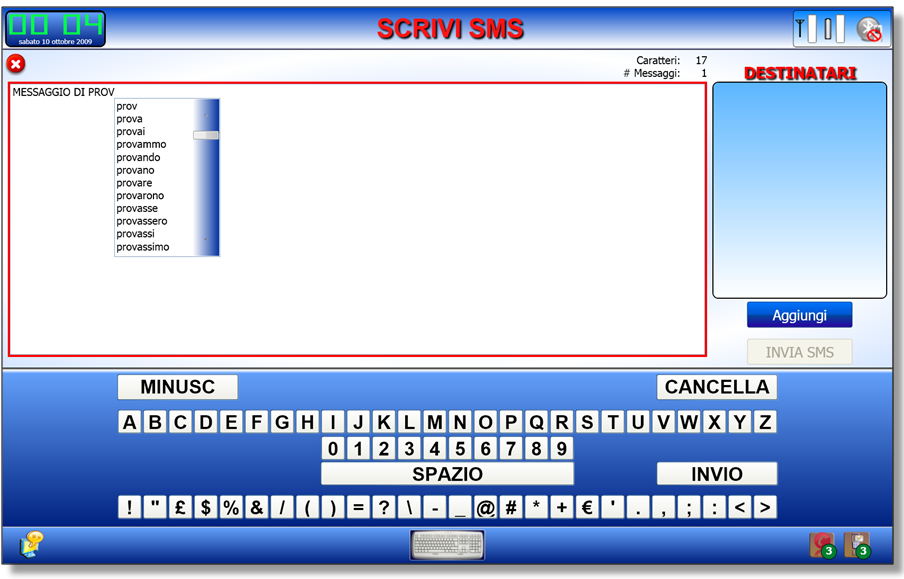
is a multi-purpose, all-in-one and good-looking new generation home-phone: it can manage phone calls, phonebook, SMS, E-Mails, Web Browser and Photos (digital frame) through an intuitive, easy and touch-friendly user interface, especially designed for aged and/or non-technologic people, which requires just a minimum effort to learn how to use it. The user interface, among other things, includes a Virtual Keyboard and a Virtual Numpad to let the system be used without external keyboard/mouse, a predictive large vocabulary input system and Text-To-Speech helper features.

Telephone and SMS features are provided by a Bluetooth mobile phone: Phome is a “Home” Bluetooth Headset unit that, when connected to a device, becomes its wireless speakerphone. Thanks to the Phome Mobile Service, a custom Bluetooth profile based on an ad-hoc client/server protocol, it represents a simple and intuitive remote control interface for mobile phones, letting aged people to use these devices to make phone calls, send/receive SMS messages or managing the phonebook through a simple and eyesight-friendly interface. The profile has been introduced to abstract the implementation from a particular mobile phone and its operating system, making Phome potentially compatible with any Bluetooth mobile phone.
The prototype has been implemented on Windows Mobile based phones (using .NET Compact Framework 3.5), but a feasibility study has been conducted on Android and Java J2ME platforms as well.

To add Bluetooth connectivity to the EeeTop, a Bluetooth USB adapter based on Widcomm stack has been used: the Widcomm stack has been chosen because it’s the only stack which gives free and well documented API that developers can use to access low-level parts, audio SCO connection included, and which let me to re-implement the Bluetooth Headset profile according to standard specifications, and to control audio routing using Win32 Multimedia API.

In addition to the WES system image, I designed and implemented:
  • a Windows Presentation Foundation application, PhomeUI, which acts as the system shell and replaces the native Windows shell “explorer”; it has been designed with a layered and modular architecture, using some recent design pattern like Model-View-ViewModel (MVVM), Separated Presentation and Composite Application, in order to support designer/developer roles separation, expansions/plug-ins, testing and a rich-user-interface framework (that let me develop all the user interface in less than two months, while working on all the other system components).
  • shared libraries (some native C++ and some managed C#) that provide the shell:
    • Bluetooth management + profiles (native)
    • Bluetooth audio management (native)
    • 3-tier database access layer to MS-SQL CE db
    • Many custom WPF UI controls
    • Basic shell and application modules functions such as events, commands, Bluetooth Manager, Audio Manager, E-Mail Manager/POP3 Client, Settings Manager, MSAPI 5.1 Text-To-Speech)
    • Basic UI functionalities (run-time loaded modules and composite user interface, Module Manager, Virtual Keyboard/Numpad and other UI controls)
  • a .NET Compact Framework 3.5 application, PhomeServiceServer, which implements the custom Bluetooth Profile Phome Mobile Service on Windows Mobile 6.0 (or greater) devices.
  • sample application modules, all developed with the MVVM pattern, which provide the end-user:
    • phone management functionalities (phone call dialing/answer, phonebook, favorite numbers);
    • SMS management (received, sent, draft, composition, Virtual Keyboard + Predictive Input aids);
    • E-Mail management (multi-POP3 account support, received/sent/draft messages, composition);
    • Phome Device Settings/one-touch Bluetooth configuration;
    • Home screen
    • Web Browser (based on Google Chromium project, integrated in WPF using a modified open-source wrapper which make it usable with the virtual keyboard);
    • Photo Album (photo viewer and full screen slideshow).

Here are some screenshots and photo taken of the device and its touch-enabled user interface during the development stage.


Conclusions


The implemented prototype system has got a minimum set of sample features, which let people and developers to evaluate its behavior in a common house environment. The goals were not to obtain a complete and working device, but to show that such kind of easy-to-use devices can be built today, with existent hardware and software technologies, despite the thousands of complicated communication device that surrounds us every day.

Obviously there’s plenty room for improvements and I already have some ideas for future developments and better user-machine interaction and house-environment integration, but for now I’m very satisfied about the reached results, the Master Degree and happy about the fact that now my grandmother can send and receive SMS/E-mails and make phone calls using its mobile phone with just few taps on Phome.

Wednesday, September 9, 2009

A new adventure

Hello to everybody!
This is my first post on my first public blog. I always wanted to have a place to write some of my thoughts and to share some of my knowledge about technology and software development, in the hope that somebody could find something interesting and useful. But unfortunately I had (and still have) very little time to do such things.

Whenever I want to do something, I usually try to get it done in the best way I can: if I know I can't do it, even before starting, then I don't start at all.

Now I have decided to start blogging, in the hope that beginning on this particular day (09/09/09) will help me to do it in the best way I can, dedicating the right efforts and time to write something about me, about my hobbies and about my work: engineering, computer science, technology and software development.

As the name of the blog itself may suggests, my interests focus on Embedded development, using Microsoft technologies, to be more specific, and all the world around them: Windows CE, Windows Mobile, Windows Embedded. Additionally, I love databases, graphics and web development, so this blog will cover also issues about SQL Server, ASP.NET, WPF, Silverlight and Windows applications development in general.

Please feel free to make comments and/or give suggestions about anything you think I could have done better or that I completely misunderstood. Of course, also comments about things you may like are appreciated!